Skip to content
Opterion-IT — home Opterion-IT

From the first phone call to the final invoice. One record, start to finish.

Most systems cover one stretch of the job: a CRM for the lead, an estimating tool for the quote, a spreadsheet for the crew, the accounting package for the bill. Opterion-IT carries the job the whole way. Lead, quote, order, change orders, purchasing, crew scheduling and progress invoicing, with nothing retyped in between.

Part CRM, part ERP. One simple application.

This is a fully integrated, cradle-to-grave system. Sales leads, quoting, order entry, purchasing, crew scheduling and progress invoicing are not separate products joined by an import. They are one application working on one record: the pieces of a CRM and the pieces of an ERP that a job shop actually uses, and none of the rest.

The CRM pieces

Customers and contacts, sales leads entered at a desk or from a phone, lead tracking, a forecast from open leads, and follow-up work assigned to a person. A lead becomes a quote without retyping a detail.

The ERP pieces

Estimating and order entry, change orders, purchasing driven by the order, stock, crew scheduling, time cards and progress billing. Everything it takes to run the job once it is sold.

What it leaves alone

Your books. Invoices, supplier bills and credits go to the accounting package you already use. It is job management software, not a new ledger.

The whole cycle at a glance

Lead, quote, order, purchasing, crew, delivery, progress invoicing, your books. A change order leaves the job while it runs and, once approved, goes back onto the same order. 1 Lead 2 Quote 3 Order 5 Purchasing 6 Crew 7 Delivery 8 Progress invoicing 9 Your books scope added mid-job 4 Change orders approved: back on the order
  1. 1 Lead
  2. 2 Quote
  3. 3 Order
  4. 4 Change orders
  5. 5 Purchasing
  6. 6 Crew
  7. 7 Delivery
  8. 8 Progress invoicing
  9. 9 Your books

Every step happens on the same record. A change order goes back onto the same job, so purchasing, the crew board and the next invoice all pick it up.

Follow one job, start to finish

Every screenshot below is the same job: a site boiler replacement, order Q-2026-00038. Look for that number as you go. Click any screenshot to see it full size.

1

The lead: a phone call on the road

You're between jobs when the phone rings: someone needs work done. Before you pull back onto the road you've added them from your phone: name, number, the address of the job, what they need. That is a sales lead the office can see straight away, with the prospect already on file.

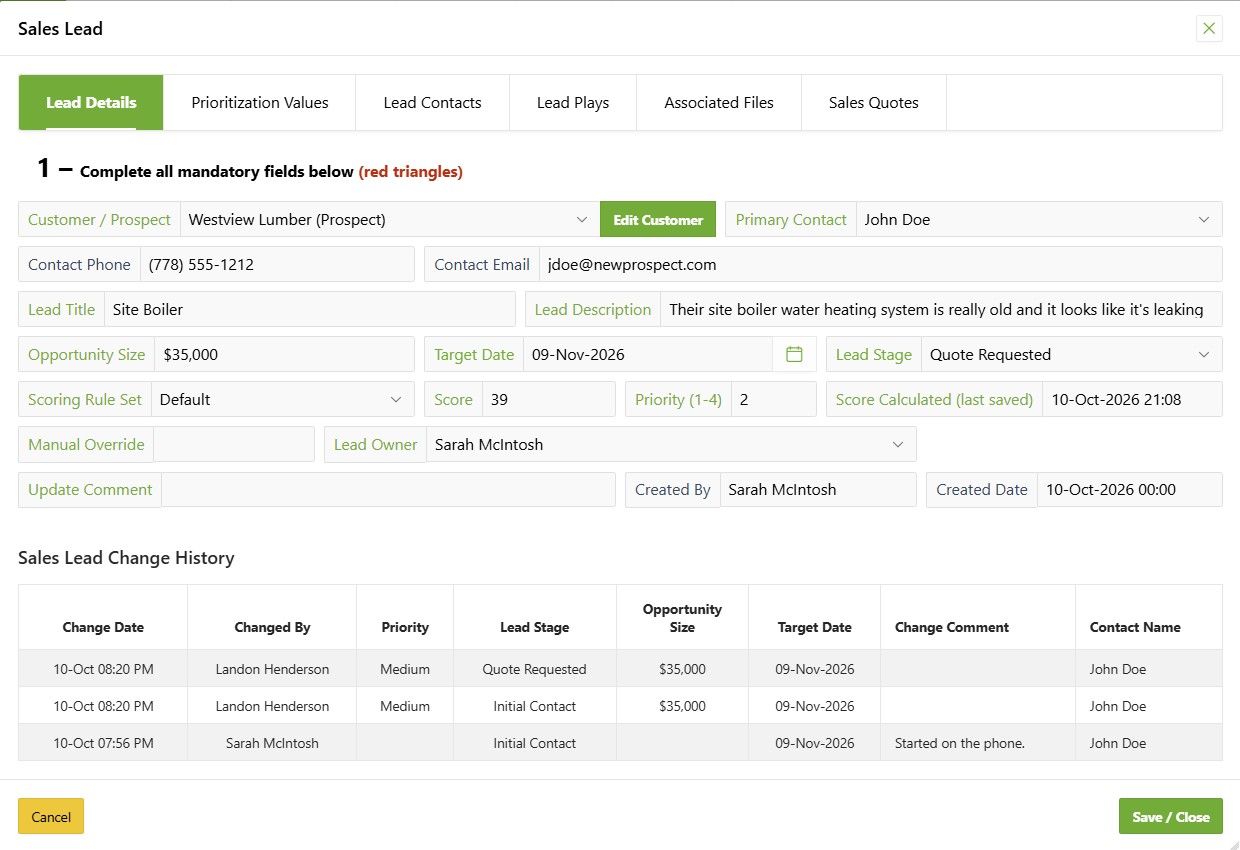
When the call comes in to the office instead, the same lead is entered at a desk in the main application. Either way it is one lead in one place, in the same system your office, crews and buyers use. Lead tracking, follow-up and a forecast from open leads all read from it. No number on the back of a receipt, no second CRM to update.

Customers and sales leads →
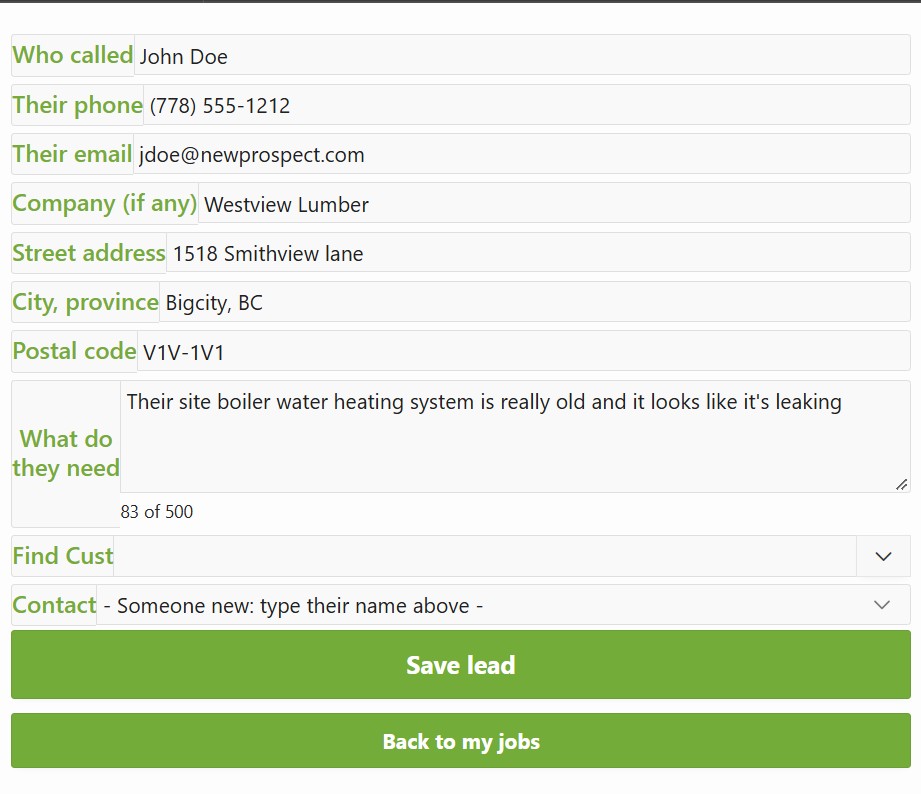
New Lead on the phone: who called, their number, the address and what they need
On the phone: who called, their number, the address of the job and what they need.
The same lead in the main application, with its stage, size, score, owner and history
The same lead at a desk: a prospect, $35,000, at Quote Requested. Its history begins Started on the phone.
2

The quote or estimate

The quote is raised from the lead, so nothing is typed twice. It is built from live product costs and broken out by subassembly where the job needs it.

For work you can't price to the dollar until the wall is open, start a time-and-materials estimate instead. Each supplier gets a request for quote in their own part numbers, and their price comes back with its good-until date. The job can't be ordered on an expired price.

Quoting and estimating →
Quote Q-2026-00038 in Draft status, priced from live costs and broken out by subassembly
Q-2026-00038 in Draft: two subassemblies, Main Boiler and Region controls, $39,498.41.
3

Accepted: the quote becomes the order

The customer says yes and the same document becomes the order. Same lines, same number; only the status moves. Order entry is one click, because there is nothing to enter. Nothing is retyped and nothing drifts.

The same quote Q-2026-00038, now in Ordered status
The same document, now Ordered. Same lines, same $39,498.41.
4

Change orders, without starting over

The customer adds scope halfway through. That becomes a change order: its own numbered section of the order, priced line by line like a small quote, and printed for the customer to sign. It doesn't touch the order total, the pick list or the invoices until they approve it.

Once approved it is on the same job, so purchasing, the crew board and the next invoice all pick it up, and it carries its own costs so you can see what the extra work earned. On time-and-materials work, costs that move re-price from actual cost and your margin. What was already invoiced stays as it was, and the difference becomes its own line.

Change orders on Quotes & Orders →
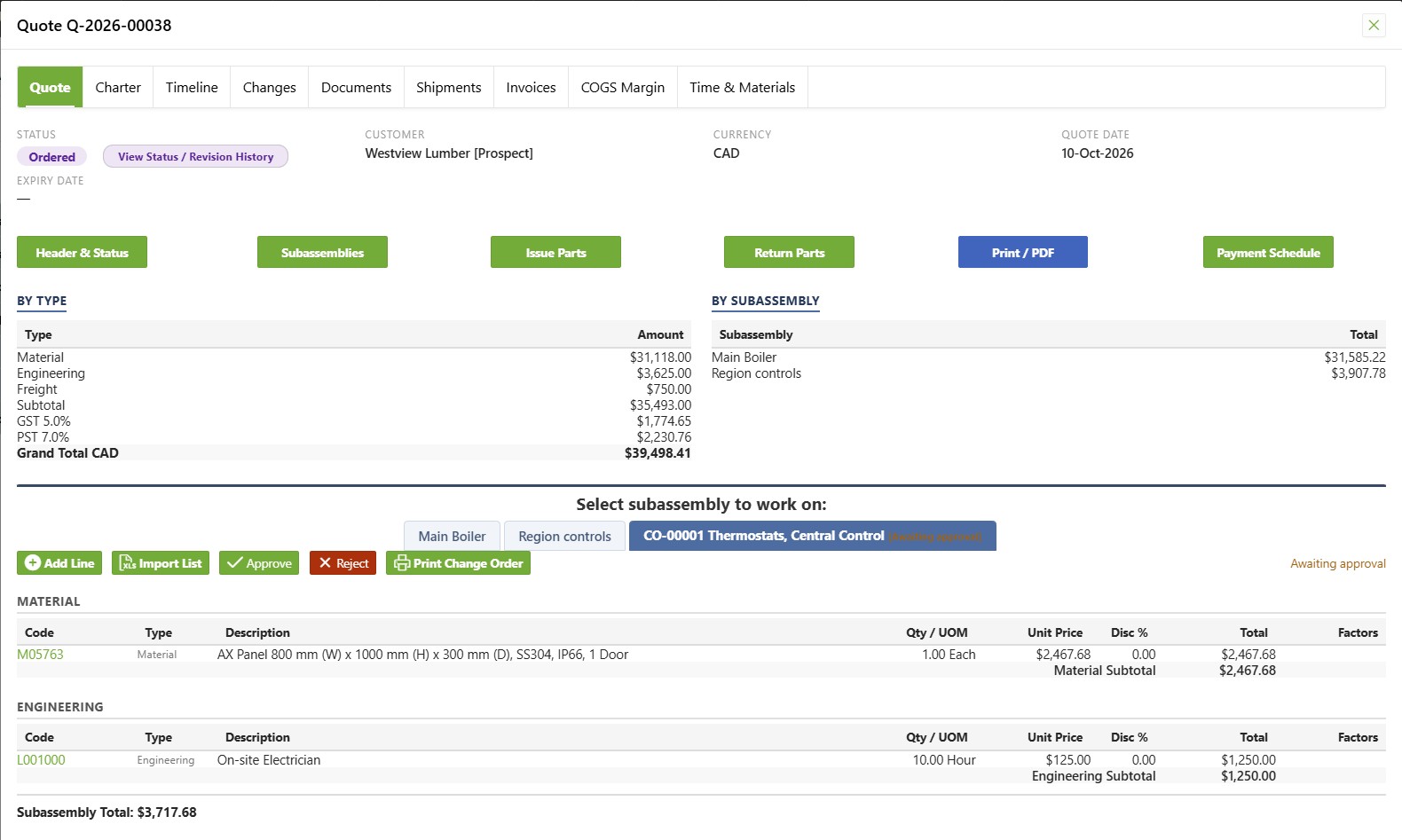
Change order CO-00001 on order Q-2026-00038, priced line by line and awaiting approval
Change order CO-00001 on the same order, priced like a small quote and awaiting approval. The order total is still $39,498.41.
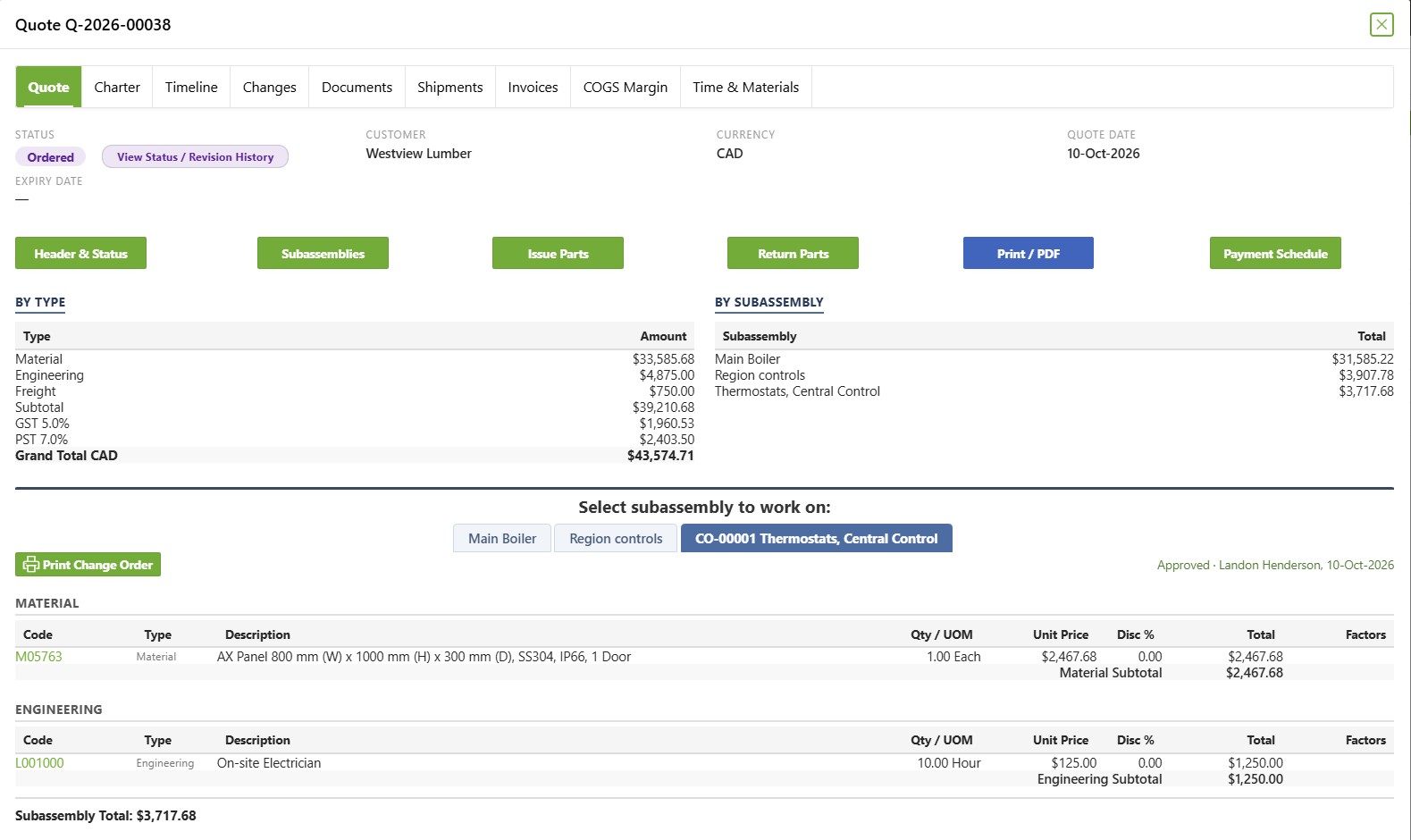
Change order CO-00001 approved, now listed as a third subassembly on order Q-2026-00038
Approved, with who approved it and when. Thermostats, Central Control is now a third subassembly at $3,717.68, and the order total is $43,574.71.
5

Purchasing: the order already knows what to buy

Anything the order needs that stock can't cover lands on one buying list, by supplier, with the job it's for and the date it's needed. Tick the lines, raise one purchase order per supplier, and receive against it. Several jobs needing the same part become one clean order. Nobody had to notice the shortfall.

Purchasing, from buying list to shelf →
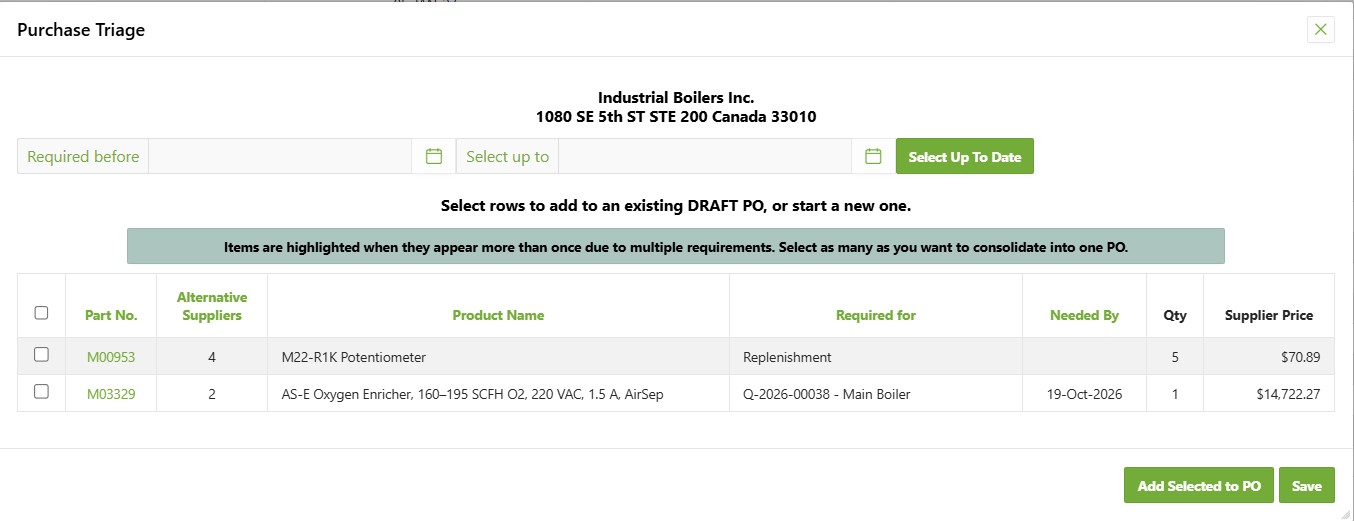
The buying list for one supplier, with a line required for Q-2026-00038 and its needed-by date
The buying list for one supplier. The second line is required for Q-2026-00038 - Main Boiler and needed by 19-Oct-2026.
Draft purchase order PO-2026-00013 carrying both lines from the buying list
Both lines on one draft purchase order, with ordered against received on each.
6

Scheduling the crew

The order knows the hours you sold and the job address, so the crew board starts there. Drag the job onto a person and a day; holidays and approved leave are already shaded.

On site, techs tap when they arrive and when they leave, and that visit becomes a line on their time card, charged to the job. A booking whose day passed with no hours recorded lands on a short list for the office.

Crew scheduling and the phone pages →
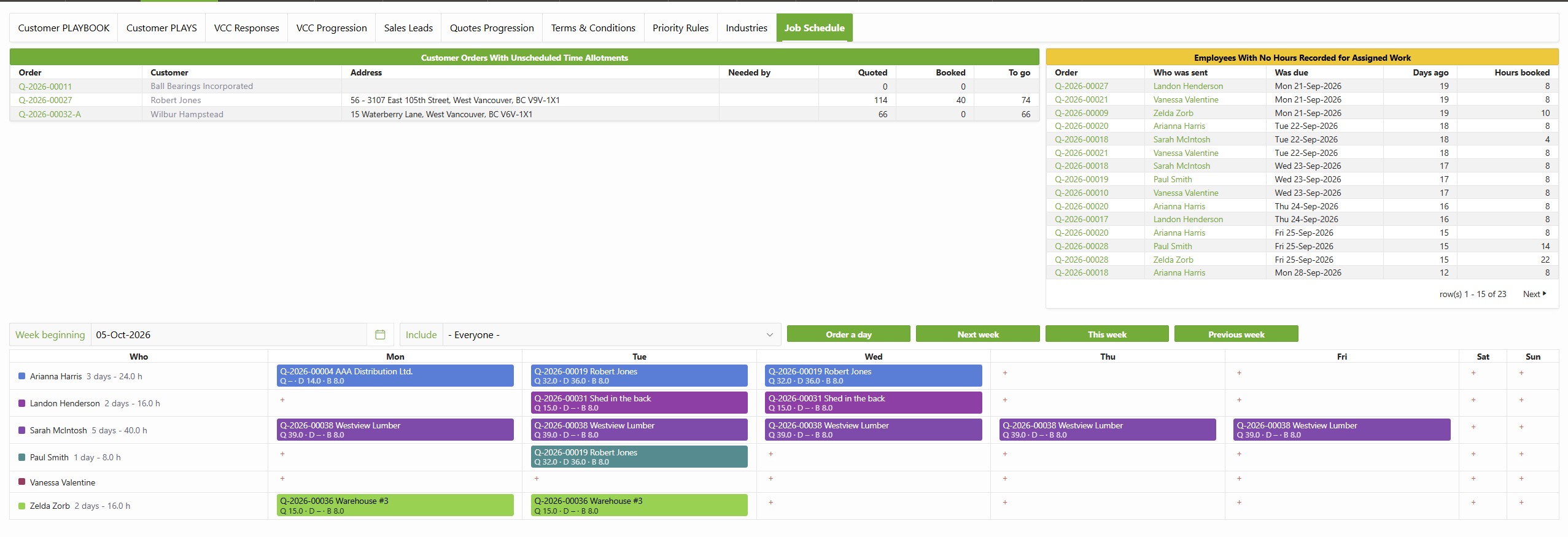
The crew schedule board for one week, with order Q-2026-00038 booked on one person Monday to Friday
Q-2026-00038 booked on one person, Monday to Friday. Above the week: orders with hours still to schedule, and bookings with no hours recorded.
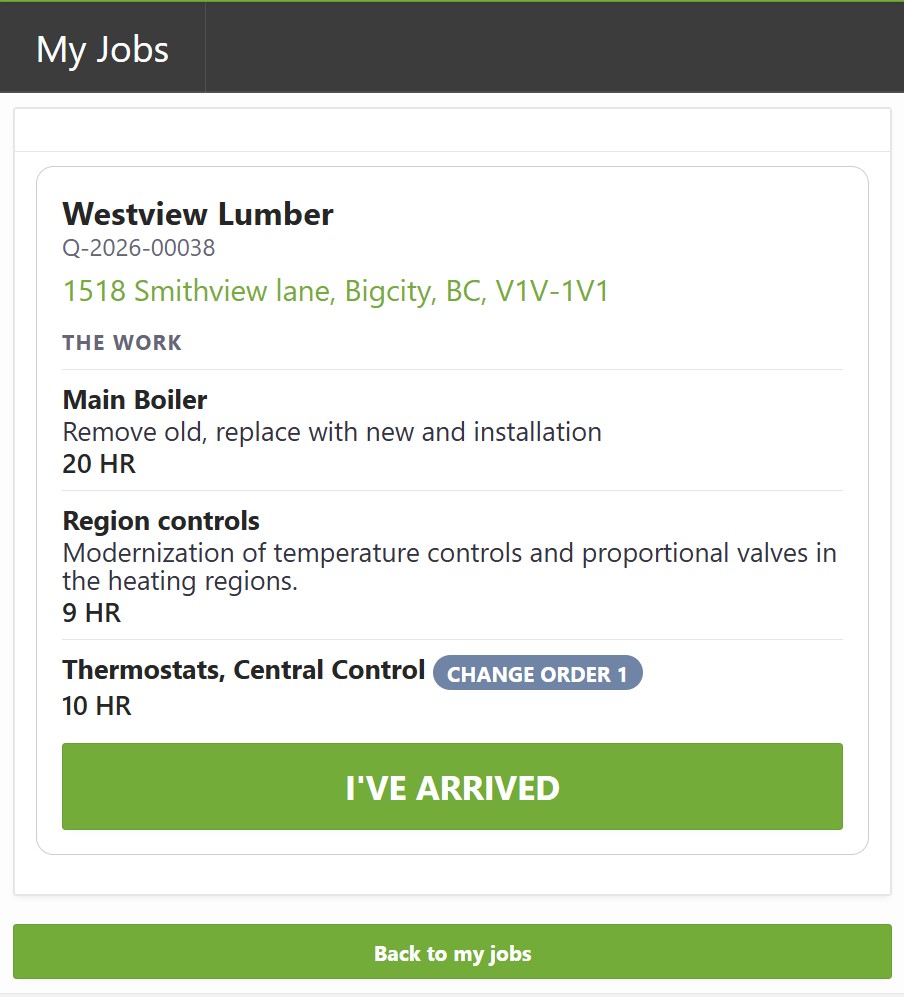
The job on a phone: customer, order number, address, the work in each section with its hours, and an arrive button
The same job on the phone: the address, the work in each section with its hours, the change order, and one button.
7

Delivery

Stock is picked against the same order number, backorders track themselves, and the customer sees one status for the whole job.

The fill and ship screen for order Q-2026-00038, with ordered, filled, remaining and on-hand quantities
Picked against Q-2026-00038: ordered, filled, remaining and quantity on hand on every line, each with its subassembly.
8

Progress invoicing: bill the order any way that suits your business

Selected lines, a whole section, a percentage schedule (say 30% on order, 40% on delivery, 30% on sign-off), or a fixed amount such as a deposit or a retention release. Mix them on the same order if that is how the job runs.

Whichever way you do your progress billing, the order tracks what is left to bill, so nothing is billed twice. Before the last invoice goes out, you are warned if a supplier still has not billed you.

The four ways to bill an order →
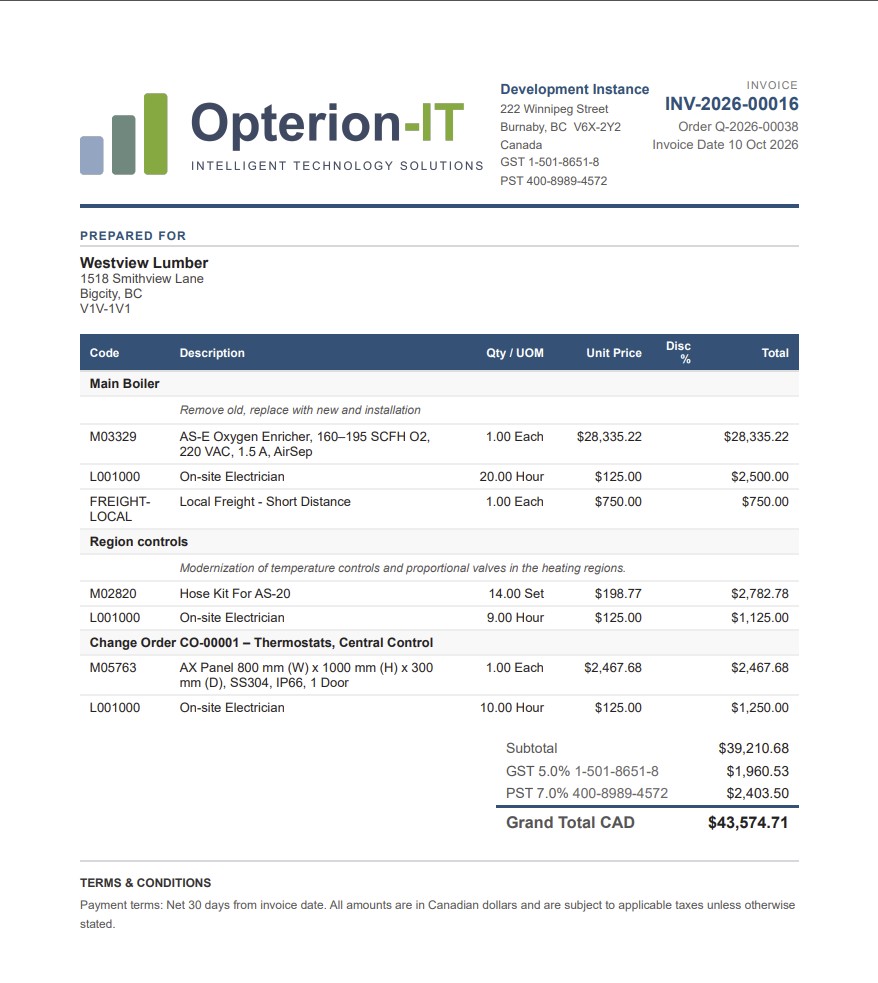
Invoice INV-2026-00016 raised against order Q-2026-00038, grouped by subassembly
Invoice INV-2026-00016 against order Q-2026-00038, grouped by subassembly, with the change order as its own section.
9

Into your books, once

Invoices, supplier bills and credits go to the accounting package you already use, as one file per batch. Every send is logged, so nothing goes twice. Your bookkeeper changes nothing about how they work, and getting paid is tracked there, where it always was.

Why we leave your accounting alone →

Why one record beats five tools

Most growing job shops stitch the cycle together from separate tools. Every handoff between them is a place where something gets retyped, missed or billed wrong.

Stage The usual stack In Opterion-IT
Lead and follow-up A CRM, or a phone's contacts The same customer record the whole business uses
Quote or estimate A spreadsheet or an estimating add-on Live costs, supplier quotes with good-until dates
Order entry The quote, typed again somewhere else The quote changes status. That is the order
Change orders Emails and a revised spreadsheet On the same job, priced line by line, signed by the customer
Purchasing Someone noticing the shortfall A buying list raised from the order itself
Crew scheduling A whiteboard or a separate app A crew board built from the hours you sold
Time cards A separate time-tracking subscription Hours land on the job they were worked on
Progress invoicing Manual invoices in the accounting package Billed any way that suits you, never twice

A new hire doesn't need six months to learn where everything lives. They need a login.

For the same list set beside named alternatives, see the feature-by-feature list.

Who it's for

Electricians, plumbers, HVAC and renovation outfits, installers and other job shops of five people or more. You've outgrown running jobs out of the accounting package, and you're not ready for a full ERP.

Who it isn't for

Five isn't a rule. It's just where most businesses start to need this, and a smaller one is welcome. It's probably not for you if you want one vendor for your website and online store too. The full list of where we don't fit is on Compare your options.

See one of your own jobs run start to finish.

30 minutes, your real scenarios, no hard sell.