
Quotes & Orders
From the first estimate to the last invoice — quotes your team builds together, time-and-materials jobs billed at what they really cost, a crew board that knows the hours you sold, and a margin you can check while the job runs, not after it.
See the whole cycle, from lead to final invoice →One quote. Five steps. No re-keying.
Everything below happens on one record, in one system — and then the finished figures go to the accounting package you already use.
Quote
Built from live product costs, with subassemblies where the job needs them.

Order
Accepted quote becomes the order. Nothing is retyped, nothing drifts.

Purchasing Triage
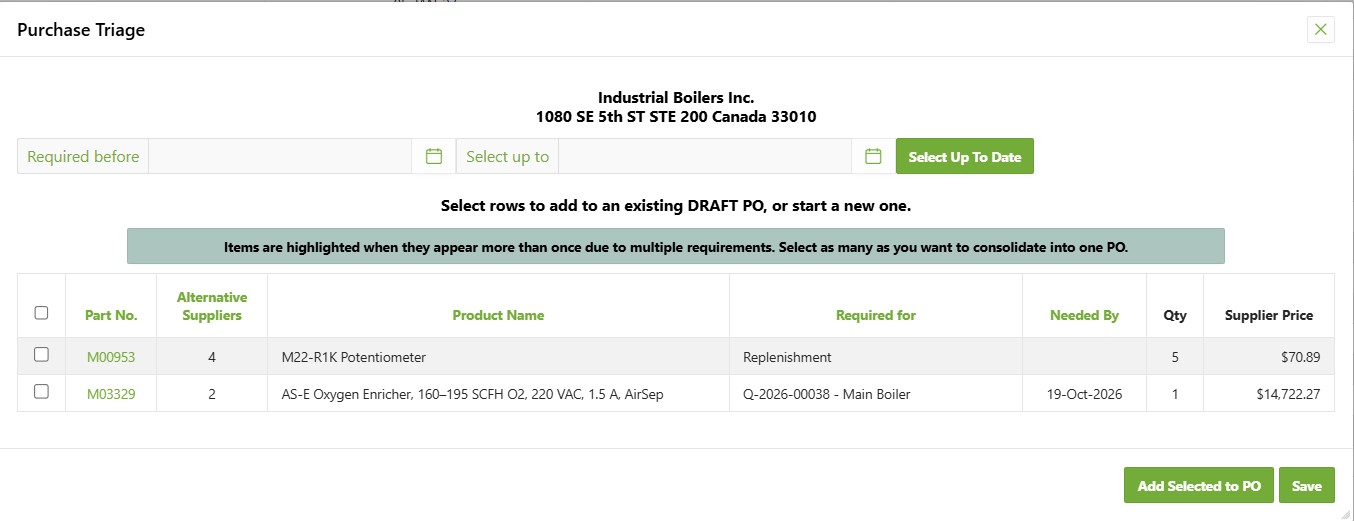
What the order needs and stock can't cover lands on one buying list, by supplier, with the date you need it.
Purchase
Tick the lines, raise the PO, receive against it. Consolidate several jobs onto one order.

Pick & ship
Stock moves, backorders track themselves, the customer sees one status.

Follow Q-2026-00038 across the strip. It's on the quote, it's on the order, and in the middle it's sitting in the Required for column of the buying list — which is the part nobody had to do. No one noticed the shortfall, chased a part number, or raised a request.
A new hire doesn't need six months to become effective. They need a login.
Bill any part of the order, four ways.
An order is rarely invoiced once. Progress invoices come off the order itself, so every one of them knows what the others already took.
Selected rows
Tick the lines that are ready — or part of a line. Three of the ten you shipped go on this invoice; the other seven stay open on the order.
A section
Bill a whole subassembly in one action: the hardware now, commissioning when it is done. Or bill what has actually shipped and the hours actually worked, across the order.
A percentage
30% on order, 40% on delivery, 30% on sign-off. Set the schedule on the order and raise each stage when it falls due.
A fixed amount
A deposit, a retention release, a figure agreed in the room. The invoice is for exactly that number.
Nothing can be billed twice — the order tracks what is left to invoice, whichever way you billed the rest, and marks itself Invoiced when nothing is. Each invoice then goes to your accounting package once. Getting paid is tracked there, where it always was.
Time and materials, billed at what the job really cost.
Some jobs cannot be priced to the dollar before the wall is open. A time-and-materials job starts as an estimate and is billed on what actually went into it — your cost and a margin you set for each section of the job, not a pile of receipts re-typed at month end.
Ask the suppliers
Each supplier gets a request for quote in their own part numbers. Their price and its good-until date come back onto the job — and the job cannot be ordered on a price that has expired.
Two lines for the customer
Each section prints as Materials and Labour: a figure and a number of hours. Your customer never sees what you paid, because the supplier detail is not in their document at all.
Cost moves, the bill follows
A supplier invoices higher, a part goes back, the crew picks up extras at the trade counter. Materials re-price from actual cost and your margin, and what was already invoiced stays as it was — the difference becomes its own line.
Supplier paperwork, matched
Tick the lines a supplier invoice covers; it has to agree with them before it posts. A return raises the credit you are owed the day the parts go back — and a restocking fee stays yours, not your customer's.
Before the last invoice on a job goes out, you are warned if a supplier still has not billed you — the moment a wrong charge is cheapest to catch.
Who is going where — and whether they went.
The order already knows the hours you sold and the address of the job. The crew board starts from there.
A week you drag jobs onto
Every job with hours still to book sits in one list. Drag it onto a person and a day; hold Ctrl to copy it to the next day or to a second tech. Holidays and approved leave are shaded before you drop.
Quoted, booked, worked
Each job shows the hours sold, the hours scheduled and the hours recorded. It stays on the to-schedule list until the bookings cover what was quoted.
On the phone: arrived, leaving
Techs see their jobs for the day, tap when they arrive and when they leave, and say what was done. That visit is a line on their own time card, already charged to the job.
Nobody quietly did not go
A booking whose day has passed with no hours against it lands on a short list for the office. And a receipt photographed on site arrives as a draft bill, not as a crumpled slip on Friday.
The job address lives on the order, so a customer with one head office and forty job sites needs no special handling.
Other modules to pair with Quotes & Orders
Know who you serve, see how the relationship has changed over time. See how they behave today, and what challenges remain in each relationship. See what activities are in progress now and activities that have completed.
Learn moreFrom a hot desk for your hybrid team to a 200-person gala — one module handles the booking, the planning, and the quote.
Learn moreMembers, renewals, categories, and access rules — all in one place, all in sync.
Learn moreSee Quotes & Orders in your data.
30 minutes. See the full workflow end-to-end. No hard sell.